The moment a customer taps "Place Order," the most anxiety-driven part of the delivery experience begins. They're watching a pin move on a map, a countdown tick from 25 minutes to 3 minutes, and a status bar shift from "Preparing" to "On the Way" to "Delivered." These real-time features are the entire experience between paying and eating.
They're also the features that almost no QA team can automate properly.
Here's why: Appium can verify that a map element exists on screen. It cannot confirm the delivery partner's pin actually moved. A find_element(AppiumBy.ID, "map_view").is_displayed() returns True whether the map is rendering correctly, frozen on stale coordinates, showing the wrong route, or displaying the partner in the middle of an ocean. The test passes. The user sees a broken map.
Live tracking, ETA countdown, order status transitions, and push notifications are all visual, dynamic, and time-dependent everything that selector-based automation was not built for.
This guide covers how to test these real-time features at scale: what specifically needs validating, why traditional tools hit a wall, and how Vision AI validates what users actually see on screen not what the element tree reports underneath.
For the complete delivery app testing checklist, see our 30 Test Cases from Order to Doorstep guide. For the broader challenge, see Why Delivery Apps Are the Hardest to Test
What Are Real-Time Features in Delivery Apps?
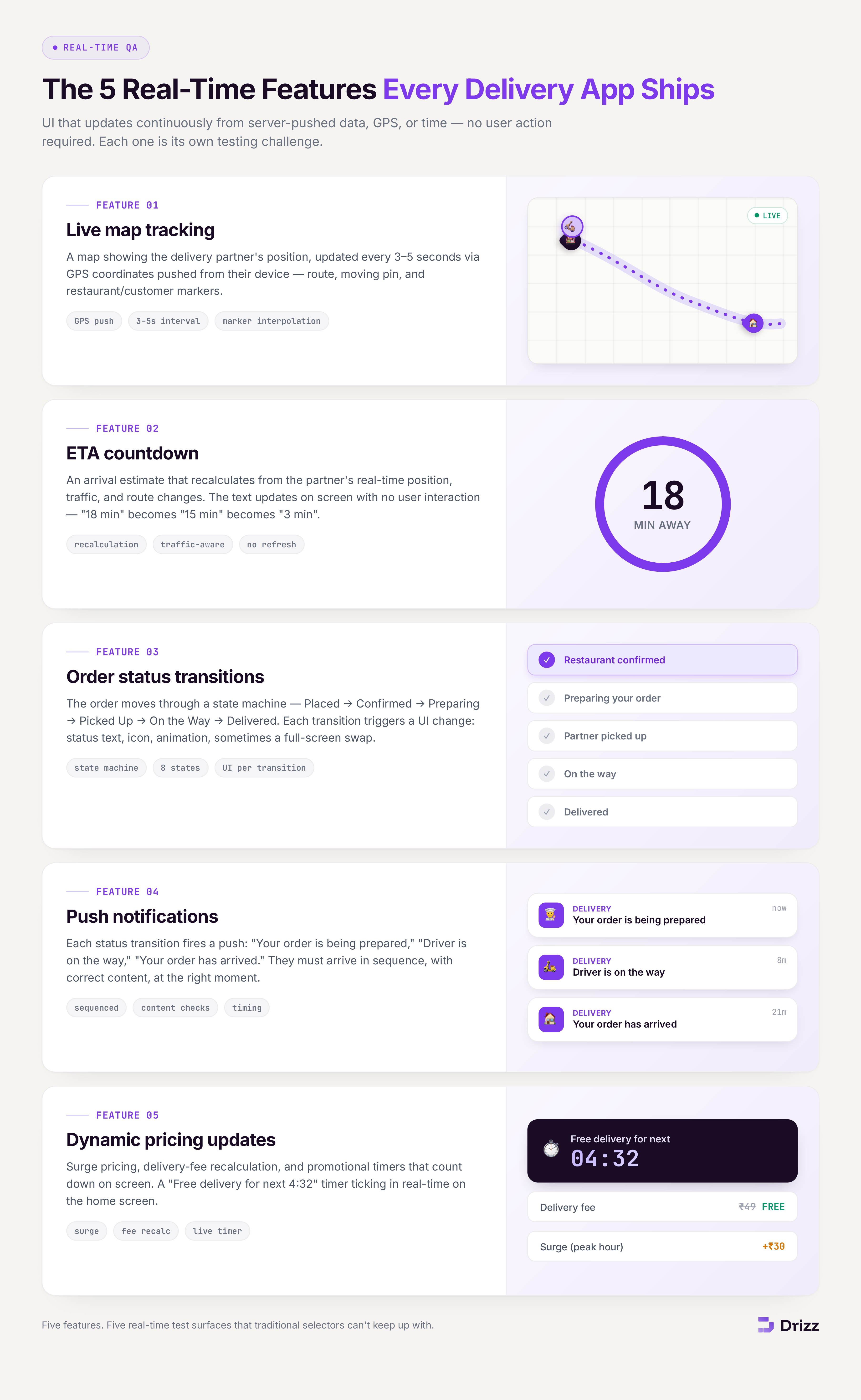
Real-time features are UI elements that update continuously based on server-pushed data, GPS coordinates, or time-based state changes without the user taking any action. In delivery apps, five features are real-time:
1. Live map tracking. A map displaying the delivery partner's current position, updated every 3-5 seconds via GPS coordinates pushed from the partner's device. The map shows the route, the partner's pin moving along it, and the restaurant and customer location markers.
2. ETA countdown. An estimated time of arrival that recalculates based on the delivery partner's real-time position, traffic conditions, and route changes. The ETA text updates on screen without user interaction "18 min" becomes "15 min" becomes "3 min" as the partner approaches.
3. Order status transitions. The order moves through a state machine: Order Placed → Restaurant Confirmed → Preparing → Ready for Pickup → Partner Assigned → Picked Up → On the Way → Nearby → Delivered. Each transition triggers a UI change status text, icon, animation, and sometimes a full screen transition.
4. Push notifications. Each order status transition generates a push notification: "Your order is being prepared," "Driver is on the way," "Your order has arrived." These notifications must arrive in sequence, with correct content, at the right time.
5. Dynamic pricing updates. Surge pricing, delivery fee recalculation, and promotional timers that count down on screen. A "Free delivery for next 4:32" timer ticking in real-time on the home screen.
Why Can't Selector-Based Tools Test Real-Time Features?
Traditional automation tools (Appium, Espresso, XCUITest) interact with the element tree a structured representation of UI components with properties like text, resource-id, and content-description. Real-time features break this model in four ways:
Maps Are Opaque Canvas Elements
Map views (Google Maps SDK, Mapbox) render to a canvas or GL surface. Appium sees one <android.view.View> or <MapView> element. The delivery partner pin, route line, restaurant marker, and customer marker are all rendered inside that canvas invisible to the element tree. Appium can verify the map element exists. It cannot verify:
- Whether the delivery partner pin is at the correct coordinates
- Whether the pin moved since the last check
- Whether the route line renders correctly
- Whether the partner pin is on the route or off it
- Whether the map is zoomed to show both partner and customer
ETA Text Changes Are Timing-Dependent
The ETA text updates server-side, pushed to the client at intervals. A test that asserts eta_text == "15 min" fails 3 seconds later when it updates to "14 min." The test is technically correct it verified a specific value at a specific moment but it tells you nothing about whether the ETA is updating correctly, calculating accurately, or displaying at all.
Status Transitions Are Sequential and Time-Bound
Order status transitions happen over 20-45 minutes in production. A test can't wait 45 minutes for a status to change. Most teams mock status transitions by pushing state changes through a test API but this only validates that the app renders a given state, not that the transition from one state to the next triggers the correct UI change, animation, and notification.
Push Notifications Are External to the App
Push notifications are delivered by the OS notification system, not rendered inside the app's element tree. Appium can check if a notification appeared in the notification shade (on Android via UiAutomator), but correlating "this notification appeared at the right time in the right sequence for
What Specifically Needs Testing for Each Real-Time Feature?
Live Map Tracking: 8 Test Scenarios
ETA Updates: 5 Test Scenarios
Order Status Transitions: 6 Test Scenarios
Push Notifications: 4 Test Scenarios
How Does Vision AI Test Real-Time Features?
Vision AI (Drizz) validates real-time features by observing the rendered screen exactly what the user sees rather than querying the element tree underneath. This is the fundamental architectural advantage for real-time testing.
Testing Map Pin Movement
Place an order and navigate to tracking screen
Verify map is visible and rendering (not blank or grey)
Verify a delivery partner marker is visible on the map
Wait 15 seconds
Verify the delivery partner marker has changed position
Verify a route line is visible connecting partner to destination
The Vision AI takes a screenshot, identifies the partner pin visually, waits, takes another screenshot, and confirms the pin has moved. No element tree. No coordinate comparison through APIs. The AI sees what the user sees: a pin that either moved or didn't.
What this catches that Appium can't: a frozen map where the MapView element exists and returns is_displayed() = True but the pin hasn't moved in 5 minutes. Appium passes. Vision AI fails correctly.
Testing ETA Countdown
On tracking screen, read the current ETA text
Wait 60 seconds
Read the ETA text again
Verify the second ETA is less than the first
Verify ETA displays in readable format (minutes or time)
The Vision AI reads the rendered text on screen ("18 min"), waits, reads again ("16 min"), and confirms the value decreased. No element ID for the ETA text needed. If the ETA field is redesigned, moved to a different position, or rendered in a different component the AI still reads it because it's looking at the screen, not querying com.app:id/eta_text.
Testing Order Status Transitions
After placing order, verify status shows "Order Placed" or "Confirmed"
Wait for status to change
Verify status now shows "Preparing" or "Being Prepared"
Verify a progress indicator has advanced
Wait for status to change
Verify status shows "On the Way"
Verify delivery partner name or info is displayed
For testing status transitions without waiting 45 minutes, most teams trigger status changes through a test API while Vision AI observes the visual result. The API pushes "status: preparing" → the AI confirms the screen shows "Preparing" with the correct visual treatment. The API pushes "status: on_the_way" → the AI confirms the screen transitions correctly.
This validates the complete loop: backend state change → frontend receives update → UI renders correctly → user sees the right status.
Testing Push Notifications
Place an order
Wait for push notification
Verify notification appears with order-related content
Tap the notification
Verify the app opens to the order tracking screen
Verify current order status is displayed
Vision AI observes the notification as it appears on the device screen reading the notification text visually to confirm it matches the expected order status. On tap, it verifies the app navigates to the correct tracking screen.
What Vision AI Cannot Test in Real-Time Features
Transparency matters. Vision AI has clear limitations for real-time testing:
GPS coordinate accuracy. Vision AI can confirm a pin moved on the map but cannot verify the pin is at the mathematically correct GPS coordinates. Coordinate accuracy requires API-level validation comparing the displayed position to the expected latitude/longitude.
Network latency measurement. Vision AI can't measure how long a status update takes to propagate from server to client. Latency measurement requires instrumentation or network-level monitoring.
Notification delivery timing. Vision AI can confirm a notification appeared but can't measure the delay between the server sending it and the device receiving it. Timing precision requires push notification analytics tools.
Map rendering performance. Whether the map renders at 60fps or drops frames during pin movement requires performance profiling tools (GameBench, HeadSpin), not visual testing.
Audio alerts. Notification sounds, in-app audio feedback for order arrival, and other audio cues require audio testing tools.
What Is the Recommended Strategy for Real-Time Feature Testing?
The Three-Layer Approach
Layer 1 API validation (backend). Verify that the real-time data pipeline is correct: GPS coordinates are pushed at expected intervals, status transitions follow the state machine, ETA calculations use the correct algorithm, push notifications are triggered on each status change. Run on every PR.
Layer 2 Visual validation (Vision AI / Drizz). Verify that the user sees the correct result of real-time data: map renders and pin moves, ETA text updates and decreases, status transitions display with correct visual treatment, notifications arrive with correct content. Run on every build across 3-5 devices.
Layer 3 Performance and timing validation (profiling tools). Measure map rendering FPS, push notification latency, status update propagation delay, and ETA accuracy over real delivery routes. Run weekly or before releases.
Triggering Status Changes in Test Environments
Since real-time features depend on external state (GPS, backend status), most teams use one of these approaches to make them testable:
Test API for status transitions. A backend endpoint that advances order status on demand: POST /test/order/{id}/advance-status. The test triggers each transition while Vision AI observes the front-end result.
GPS simulation. Mock GPS coordinates using Appium's setLocation, Android's mock location provider, or iOS's simulated location scheme. Simulate a delivery route by pushing a sequence of coordinates and validating that the map pin follows.
Staged test orders. In staging environments, create orders with accelerated timelines where the full Placed → Delivered cycle completes in 5 minutes instead of 45. Vision AI observes each transition in real-time.
Frequently Asked Questions
Can Appium verify that a map pin moved?
No. Appium sees the map as a single opaque element (MapView or SurfaceView). It can verify the map element exists and is displayed, but it cannot see individual pins, routes, or markers rendered inside the map canvas. Vision AI can observe the pin visually and confirm its position changed between two screenshots.
How do you test ETA accuracy, not just display?
ETA accuracy requires comparing the displayed ETA against the actual delivery time. This is a data analysis task, not a UI test: log the ETA at order placement, log the actual delivery timestamp, and compare across hundreds of orders. Vision AI validates that the ETA displays and updates correctly on screen. Accuracy validation happens in analytics.
Can Vision AI test real-time features on every build?
Yes, when combined with a test API that triggers status transitions. A CI pipeline can: place a test order, trigger status transitions via API, and have Vision AI validate each visual transition all within a 2-3 minute automated run. This catches rendering regressions on every build without waiting for real deliveries.
What about testing real-time features across different network conditions?
Combine network simulation (Charles Proxy, Network Link Conditioner) with Vision AI observation. Simulate 3G or high-latency conditions, trigger a status update, and have Vision AI measure how long until the visual change appears. This catches cases where the UI shows stale data under poor connectivity.
How do delivery apps test live tracking in staging vs production?
Staging environments typically use simulated delivery partners that follow predefined routes at accelerated speed. The GPS coordinates are pushed at 1-second intervals instead of real-time, completing a "delivery" in 2-5 minutes. Vision AI validates the visual experience of this simulated delivery the same way it would validate a real one.